CGINF - Coordenação Geral de Informações Gerenciais
DIGID - Diretoria de Governança e Inteligência de dados
Data de Publicação
17 de abril de 2025
Resumo
Este tutorial aborda o cálculo e a visualização do Índice de Gini, uma medida estatística amplamente utilizada para avaliar a desigualdade na distribuição de renda em populações ou regiões.
1 Carregamento da base, limpeza e manipulação dos dados
Base bruta
Código
# carregar a base de dados em excel e compilar todas as abas em um único arquivo# Carregando as bibliotecas necessáriaslibrary(readxl)library(dplyr)library(purrr)library(tidyr)library(ggplot2)library(ggtext)library(ggdist)library(glue)library(patchwork)library(camcorder)library(gt)library(ggstatsplot)library(plotly)library(ggalt)#gg_record(dir = "tidytuesday-temp", device = "png", width = 10, height = 8, units = "in", dpi = 320)# Define o caminho do arquivofile_path <-"data/BaseDados_EstudoDesigualdades.xlsx"# Obtém os nomes de todas as abas no Excelsheet_names <-excel_sheets(file_path)# excluir abas que não serão utilizadas # aba FORA sheet_names <- sheet_names[!sheet_names %in%c("FORA")]# Lê todas as abas e combina em uma única base usando purrr::mapBaseDados_Unica <- sheet_names %>%map_df(~read_excel(file_path, sheet = .x) %>%mutate(sheet_name = .x)) # Adiciona o nome da aba como coluna (opcional)# preencher valores NA na coluna escolaridade_cargo com "Não Informado"# filtrar apenas campos que possuem servidoresdf_gini <- BaseDados_Unica |> janitor::clean_names() |>replace_na(list(escolaridade_cargo ="Sem informação")) |>rename( "2026"= ano_2026, "2023"= mai_23 ) |>pivot_longer(`2023`:`2026`, names_to ="Ano", values_to ="remun") |>filter(qtd >0) library(DT)df_gini %>%datatable(rownames =FALSE,filter ="top",extensions ='Buttons',options =list(pageLength =5,scrollX =TRUE,dom ='Bfrtip', # B = Buttons, f = filter, r = processing, t = table, i = info, p = paginationbuttons =c('copy', 'csv', 'excel') ) ) %>%formatStyle(columns =names(df_gini), target ="row",lineHeight ="12px",fontSize ="12px" )
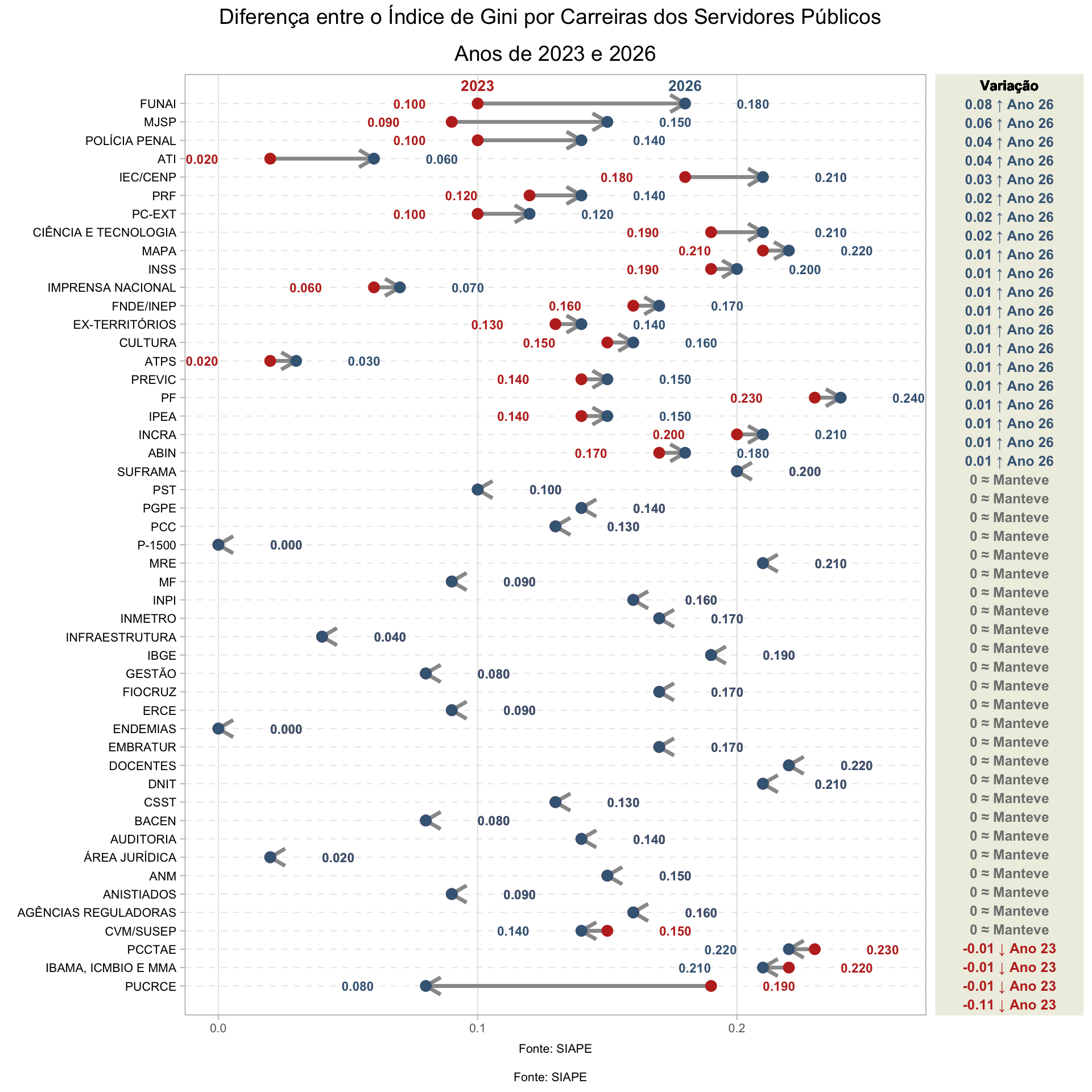
2 Gráfico dumbbell Carreiras
Código
# Expandir a base de dados com base na quantidade de observaçõesdf_expandido <- df_gini %>%uncount(qtd)# Calculo do indice de gini por anodf_gini_orgao <- df_expandido |>#filter(Ano == "2023") |> group_by(orgao_area, Ano) |>summarise(total_remun =sum(remun, na.rm =TRUE),gini_index =ifelse(total_remun >0, reldist::gini(remun), NA) ) |>select(-total_remun) |>ungroup() |>mutate(gini_index =round(gini_index, 2))# pivotar wide df_gini_orgao_wide <- df_gini_orgao |>pivot_wider(names_from = Ano, values_from = gini_index) |>mutate(gap =`2026`-`2023`) |>group_by(orgao_area) |>mutate(max=max(`2023`, `2026`)) |>ungroup() # Reordenando a variável orgao_area com base no gap em ordem decrescentedf_long_i <- df_gini_orgao_wide |>arrange(gap) |>mutate(labels=forcats::fct_reorder(orgao_area , gap)) |>ungroup()df_long <- df_long_i %>%select(-c(orgao_area))%>%pivot_longer(`2023`:`2026`, names_to ="name", values_to ="value") library(forcats)library(scales)nudge_value =0.2
Código
library(ggplot2)library(dplyr)library(tidyr)library(scales)# Assumindo que df_long_i já tenha as colunas "labels", "2023", "2026"# Criando base para as setasdf_arrows <- df_long_i %>%mutate(x_start =`2023`,x_end =`2026`,y_pos = labels ) # Gráficop_main <- df_long %>%ggplot(aes(x = value, y = labels)) +# Adicionando setas entre 2023 e 2026geom_segment(data = df_arrows,aes(x = x_start, xend = x_end, y = y_pos, yend = y_pos),arrow =arrow(length =unit(0.4, "cm")),color ="gray60", linewidth =1.2) +# Pontosgeom_point(aes(color = name), size =3) +# Rótulos com os valoresgeom_text(aes(label =label_number(accuracy =0.001)(value), color = name),size =3,fontface ="bold",nudge_x =if_else(df_long$value == df_long$max, 0.02, -0.02),hjust =if_else(df_long$value == df_long$max, 0, 1)) +# Rótulo do ano no final (caso deseje)geom_text(aes(label = name, color = name),data = df_long %>%filter(gap ==max(gap)),nudge_y =1,fontface ="bold",size =3.5) +# Tematheme_light(base_size =12) +theme(legend.position ="none",axis.text.y =element_text(color ="black", size =8),axis.text.x =element_text(color ="#666666", size =8),axis.title =element_blank(),panel.grid.major.y =element_line(color ="gray90", linetype ="dashed"),panel.grid.minor =element_blank()) +# Título e fontelabs(title ="Anos de 2023 e 2026",caption ="Fonte: SIAPE" ) +# Coresscale_color_manual(values =c("#BF2F24", "#436685")) +# Limitescoord_cartesian(ylim =c(0, 50))# p_maindf_gap= df_long_i %>%# note i am using df and not df_longmutate(label=fct_reorder(labels, abs(gap)), #order label by descending gapsgap_party_max =case_when(`2023`>`2026`~" ↓ Ano 23",`2023`==`2026`~" ≈ Manteve",TRUE~" ↑ Ano 26"),# format gap valuesgap_label=paste0( round(gap, 2), gap_party_max) %>%fct_inorder() #turns into factor to bake in the order )#df_gapp_gap= df_gap %>%ggplot(aes(x=gap,y=labels)) +geom_text(aes(x=0, label=gap_label, color=gap_party_max),fontface="bold",size=3.25) +geom_text(aes(x=0, y=49.5), # 7 because that's the # of y-axis valueslabel="Variação",nudge_y =.5, # match the nudge value of the main plot legend fontface="bold",size=3.25) +theme_void() +coord_cartesian(xlim =c(-.05, 0.05), ylim=c(1,50) # needs to match main plot )+theme(plot.margin =margin(l=0, r=0, b=0, t=0), #otherwise it adds too much spacepanel.background =element_rect(fill="#EFEFE3", color="#EFEFE3"),legend.position ="none" )+scale_color_manual(values=c("#436685", "#BF2F24", "grey50" )) #p_gapp_main + p_gap +plot_layout(widths =c(1, 0.2)) +plot_annotation(title ="Diferença entre o Índice de Gini por Carreiras dos Servidores Públicos",caption ="Fonte: SIAPE" ) &theme(plot.title =element_text(size =14, hjust =0.5),plot.caption =element_text(size =8, hjust =0.5))
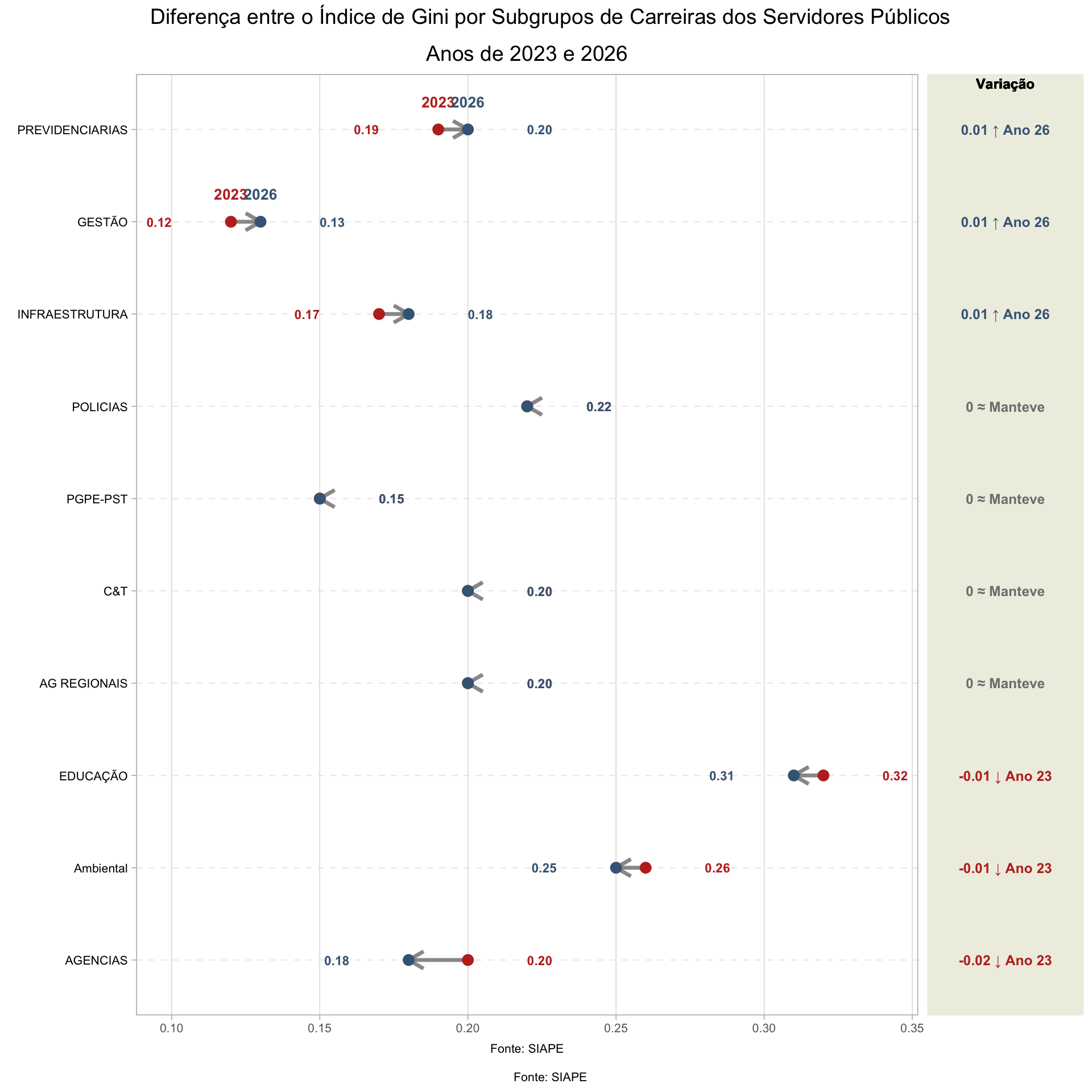
3 Gráfico dumbbell SubGrupos Carreiras
Código
# Calculo do indice de gini por anodf_gini_orgao <- df_expandido |>#filter(Ano == "2023") |> group_by(subgrupo, Ano) |>summarise(total_remun =sum(remun, na.rm =TRUE),gini_index =ifelse(total_remun >0, reldist::gini(remun), NA) ) |>select(-total_remun) |>ungroup() |>mutate(gini_index =round(gini_index, 2))# pivotar wide df_gini_orgao_wide <- df_gini_orgao |>pivot_wider(names_from = Ano, values_from = gini_index) |>mutate(gap =`2026`-`2023`) |>group_by(subgrupo) |>mutate(max=max(`2023`, `2026`)) |>ungroup() # Reordenando a variável orgao_area com base no gap em ordem decrescentedf_long_i <- df_gini_orgao_wide |>arrange(gap) |>mutate(labels=forcats::fct_reorder(subgrupo , gap)) |>ungroup()df_long <- df_long_i %>%select(-c(subgrupo))%>%pivot_longer(`2023`:`2026`, names_to ="name", values_to ="value")
Código
# Criando base para as setasdf_arrows <- df_long_i %>%mutate(x_start =`2023`,x_end =`2026`,y_pos = labels ) # Gráficop_main <- df_long %>%ggplot(aes(x = value, y = labels)) +# Adicionando setas entre 2023 e 2026geom_segment(data = df_arrows,aes(x = x_start, xend = x_end, y = y_pos, yend = y_pos),arrow =arrow(length =unit(0.4, "cm")),color ="gray60", linewidth =1.2) +# Pontosgeom_point(aes(color = name), size =3) +# Rótulos com os valoresgeom_text(aes(label =label_number(accuracy =0.01)(value), color = name),size =3,fontface ="bold",nudge_x =if_else(df_long$value == df_long$max, 0.02, -0.02),hjust =if_else(df_long$value == df_long$max, 0, 1)) +# Rótulo do ano no final (caso deseje)geom_text(aes(label = name, color = name),data = df_long %>%filter(gap ==max(gap)),nudge_y =0.3,fontface ="bold",size =3.5) +# Tematheme_light(base_size =12) +theme(legend.position ="none",axis.text.y =element_text(color ="black", size =8),axis.text.x =element_text(color ="#666666", size =8),axis.title =element_blank(),panel.grid.major.y =element_line(color ="gray90", linetype ="dashed"),panel.grid.minor =element_blank()) +# Título e fontelabs(title ="Anos de 2023 e 2026",caption ="Fonte: SIAPE" ) +# Coresscale_color_manual(values =c("#BF2F24", "#436685")) # Limites# coord_cartesian(ylim = c(0, 50))# p_maindf_gap= df_long_i %>%# note i am using df and not df_longmutate(label=fct_reorder(labels, abs(gap)), #order label by descending gapsgap_party_max =case_when(`2023`>`2026`~" ↓ Ano 23",`2023`==`2026`~" ≈ Manteve",TRUE~" ↑ Ano 26"),# format gap valuesgap_label=paste0( round(gap, 2), gap_party_max) %>%fct_inorder() #turns into factor to bake in the order )#df_gapp_gap= df_gap %>%ggplot(aes(x=gap,y=labels)) +geom_text(aes(x=0, label=gap_label, color=gap_party_max),fontface="bold",size=3.25) +geom_text(aes(x=0, y=10), # 7 because that's the # of y-axis valueslabel="Variação",nudge_y =.5, # match the nudge value of the main plot legend fontface="bold",size=3.25) +theme_void() +coord_cartesian(xlim =c(-.05, 0.05), ylim=c(1,10) # needs to match main plot )+theme(plot.margin =margin(l=0, r=0, b=0, t=0), #otherwise it adds too much spacepanel.background =element_rect(fill="#EFEFE3", color="#EFEFE3"),legend.position ="none" )+scale_color_manual(values=c("#436685", "#BF2F24", "grey50" )) #p_gapp_main + p_gap +plot_layout(widths =c(1, 0.2)) +plot_annotation(title ="Diferença entre o Índice de Gini por Subgrupos de Carreiras dos Servidores Públicos",caption ="Fonte: SIAPE" ) &theme(plot.title =element_text(size =14, hjust =0.5),plot.caption =element_text(size =8, hjust =0.5))
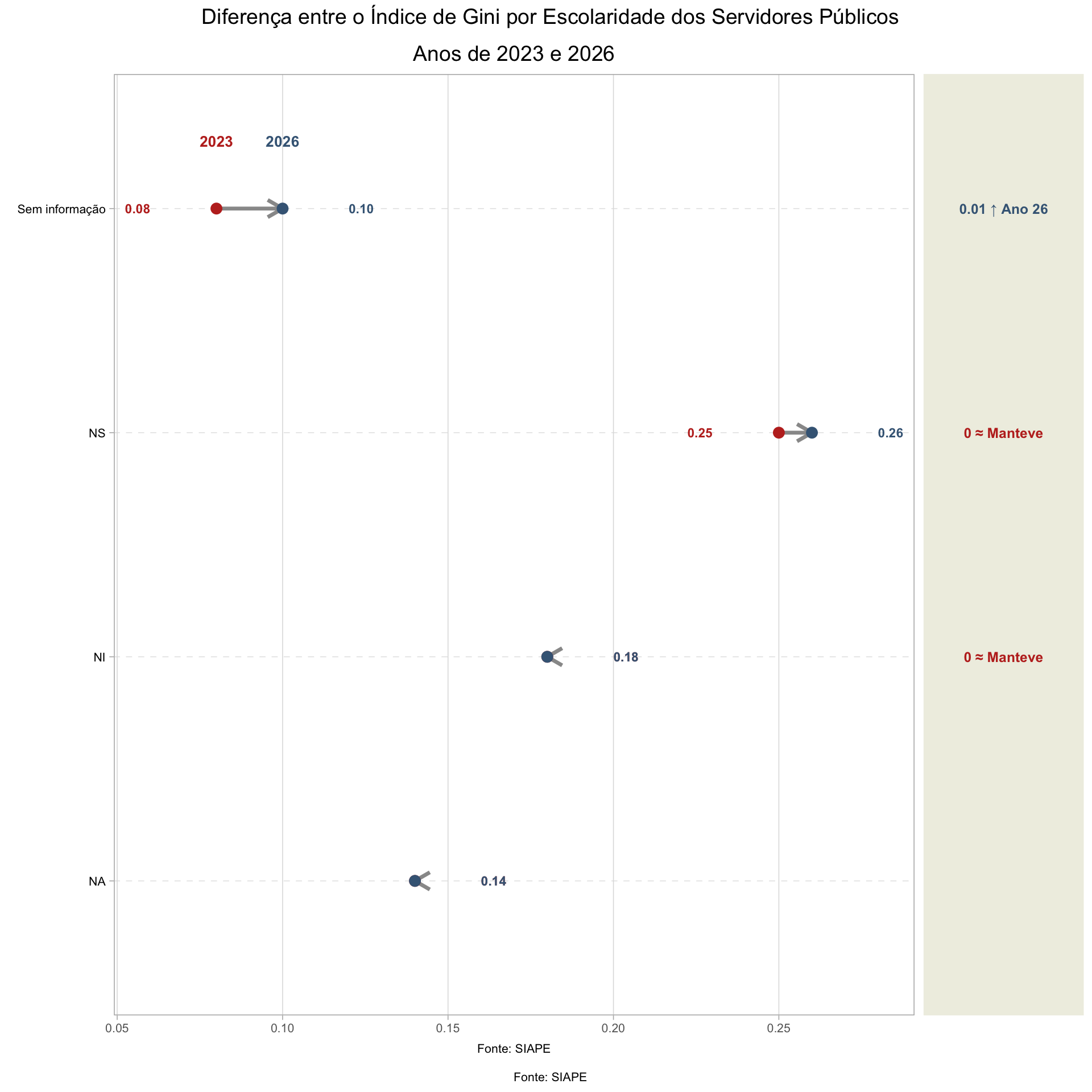
4 Gráfico dumbbell Escolaridade
Código
# Calculo do indice de gini por anodf_gini_orgao <- df_expandido |>#filter(Ano == "2023") |> group_by(escolaridade_cargo, Ano) |>summarise(total_remun =sum(remun, na.rm =TRUE),gini_index =ifelse(total_remun >0, reldist::gini(remun), NA) ) |>select(-total_remun) |>ungroup() |>mutate(gini_index =round(gini_index, 2))# pivotar wide df_gini_orgao_wide <- df_gini_orgao |>pivot_wider(names_from = Ano, values_from = gini_index) |>mutate(gap =`2026`-`2023`) |>group_by(escolaridade_cargo) |>mutate(max=max(`2023`, `2026`)) |>ungroup() # Reordenando a variável orgao_area com base no gap em ordem decrescentedf_long_i <- df_gini_orgao_wide |>arrange(gap) |>mutate(labels=forcats::fct_reorder(escolaridade_cargo , gap)) |>ungroup()df_long <- df_long_i %>%select(-c(escolaridade_cargo))%>%pivot_longer(`2023`:`2026`, names_to ="name", values_to ="value")
Código
# Criando base para as setasdf_arrows <- df_long_i %>%mutate(x_start =`2023`,x_end =`2026`,y_pos = labels ) # Gráficop_main <- df_long %>%ggplot(aes(x = value, y = labels)) +# Adicionando setas entre 2023 e 2026geom_segment(data = df_arrows,aes(x = x_start, xend = x_end, y = y_pos, yend = y_pos),arrow =arrow(length =unit(0.4, "cm")),color ="gray60", linewidth =1.2) +# Pontosgeom_point(aes(color = name), size =3) +# Rótulos com os valoresgeom_text(aes(label =label_number(accuracy =0.01)(value), color = name),size =3,fontface ="bold",nudge_x =if_else(df_long$value == df_long$max, 0.02, -0.02),hjust =if_else(df_long$value == df_long$max, 0, 1)) +# Rótulo do ano no final (caso deseje)geom_text(aes(label = name, color = name),data = df_long %>%filter(gap ==max(gap)),nudge_y =0.3,fontface ="bold",size =3.5) +# Tematheme_light(base_size =12) +theme(legend.position ="none",axis.text.y =element_text(color ="black", size =8),axis.text.x =element_text(color ="#666666", size =8),axis.title =element_blank(),panel.grid.major.y =element_line(color ="gray90", linetype ="dashed"),panel.grid.minor =element_blank()) +# Título e fontelabs(title ="Anos de 2023 e 2026",caption ="Fonte: SIAPE" ) +# Coresscale_color_manual(values =c("#BF2F24", "#436685")) # Limites# coord_cartesian(ylim = c(0, 50))# p_maindf_gap= df_long_i %>%# note i am using df and not df_longmutate(label=fct_reorder(labels, abs(gap)), #order label by descending gapsgap_party_max =case_when(`2023`>`2026`~" ↓ Ano 23",`2023`==`2026`~" ≈ Manteve",TRUE~" ↑ Ano 26"),# format gap valuesgap_label=paste0( round(gap, 2), gap_party_max) %>%fct_inorder() #turns into factor to bake in the order )#df_gapp_gap= df_gap %>%ggplot(aes(x=gap,y=labels)) +geom_text(aes(x=0, label=gap_label, color=gap_party_max),fontface="bold",size=3.25) +geom_text(aes(x=0, y=10), # 7 because that's the # of y-axis valueslabel="Variação",nudge_y =.5, # match the nudge value of the main plot legend fontface="bold",size=3.25) +theme_void() +coord_cartesian(xlim =c(-.05, 0.05), ylim=c(0,3) # needs to match main plot )+theme(plot.margin =margin(l=0, r=0, b=0, t=0), #otherwise it adds too much spacepanel.background =element_rect(fill="#EFEFE3", color="#EFEFE3"),legend.position ="none" )+scale_color_manual(values=c("#436685", "#BF2F24", "grey50" )) #p_gapp_main + p_gap +plot_layout(widths =c(1, 0.2)) +plot_annotation(title ="Diferença entre o Índice de Gini por Escolaridade dos Servidores Públicos",caption ="Fonte: SIAPE" ) &theme(plot.title =element_text(size =14, hjust =0.5),plot.caption =element_text(size =8, hjust =0.5))